
Quick answer: Reviews compound. A business that collects three or four a month year-round ends up in a completely different position than one that begs for fifteen every couple of years. The goal isn’t a push; it’s a routine: one trigger, one link, one open-ended ask that goes to every customer. That last part matters more than it used to, because Google’s 2026 policy updates made several common review tactics off-limits.
In this guide
- Why reviews carry more weight now
- What Google changed in 2026
- When to ask: the moment of visible relief
- Three asks, by channel
- Put the link where the work ends
- Ask everyone, including the tough ones
- How to answer a three-star review
- What an AI assistant pulls from your reviews
- The routine, in five minutes a week
- Common questions
Most local businesses don’t have a Google Reviews problem. They have a memory problem. The work gets done well. The customer is happy. Everybody shakes hands, the truck pulls out, and the next job is already waiting. Nobody asks. Two weeks later somebody remembers to send a text, but by then the furnace has been running so long the customer has stopped thinking about it, and the message goes unanswered.
Then once a year, usually after a competitor’s profile starts looking a lot better, the whole office gets asked to hustle up reviews. Eleven come in over a week and a half. Google’s systems notice that too.
The fix isn’t more effort. It’s a smaller, duller habit that runs on its own.
Why Reviews Carry More Weight Now

Three separate things run on your Google Reviews profile, and only one of them is the star rating.
The local map results. Review volume, recency, and rating all feed into which businesses show up in the three-pack. This has been true for years.
The decision. A homeowner comparing two contractors reads reviews to answer a question the websites can’t: what is it like when something goes sideways? Your response to a mediocre review often does more work here than five perfect ones.
AI answers. This is the newer one. When somebody asks an assistant who’s good for water heater replacement in Bemidji, the assistant reads review text. Not just the number. The actual words. We’ll get into what it’s looking for further down, because it changes what a good review profile looks like.
What Google Changed in 2026
Worth clearing this ground first, because a fair number of businesses are running a review process that was standard advice two years ago and is a policy violation today.
Google tightened things up in a few steps. On December 31, 2025, it finally published official documentation for generating Google Reviews request links and QR codes straight from your Business Profile, which had existed quietly since the previous March. Then on April 16, 2026, Google published its Trust and Safety Report for Maps, and the day after, it added two new clauses to the Rating Manipulation section of the Maps user-generated content policy.
What’s off the table now:
- Incentives of any kind. Discounts, gift cards, free service, loyalty points, entry into a drawing. This has always been against policy. Enforcement got serious.
- Review gating. Screening customers first and only sending the review link to the happy ones. Very common in review software. Not allowed.
- Staff review quotas. Asking your techs to bring in five reviews a month, or running a leaderboard tied to review counts.
- Asking customers to mention a specific staff member by name, or to include any particular content in what they write. This is the clause that surprised people. Directing what goes in a review is now explicitly named.
- On-premises pressure. Kiosks, the shared iPad at the counter, the tablet handed to somebody before they leave. Multiple reviews from one device or one IP also trip spam detection.
What’s still fine, and encouraged:
- A follow-up text or email after the job closes, with a direct review link.
- The link on your invoices, receipts, leave-behind cards, and email signature.
- A QR code that goes to your review page, printed on things customers take with them.
- Asking, out loud, whether someone would be willing to share their experience online.
- Responding to every review, good and bad.
The through-line is simple enough. Google is fine with you asking. It’s not fine to steer. Keep the ask open-ended and send it to everybody, and you’re clear.
When to Ask: The Moment of Visible Relief

There’s a window on every job when the customer is most likely to say yes, and it’s shorter than most people think.
It’s the moment the problem visibly stops being a problem. The heat kicks on. The water runs clear. The panel gets closed up, and the lights stay on. There’s a beat right there where the customer exhales and says some version of, “Oh, thank god.“
That’s the ask. Not three days later in a text that arrives during dinner.
Practically, that means it happens on site, from the person who did the work, and it takes about eight seconds. Then the link follows in a text or email the same day so there’s something to tap when they sit down. Verbal ask plus same-day link is the whole mechanism. Businesses that separate those two steps by a week get a fraction of the response.
One caution that comes straight out of the new rules: the ask happens as they’re wrapping up, not while you stand there waiting for them to type. Handing someone a phone and watching is exactly the on-premises pressure Google is now filtering for. Ask, send the link, drive away.
Three Asks, by Channel
All three are deliberately open-ended. No wording suggestions, no names, no hints about stars. That’s not just policy safety; it also produces better reviews, because a customer writing in their own words says more useful things than one filling in a template.
In person, at the truck:
“Glad we got that sorted. If you’ve got a minute sometime, we’d really appreciate an honest review on Google — it’s most of how people around here find us. I’ll text you the link so you don’t have to go hunting.”
Text, same day:
Hi Dana — thanks again for having us out today. If you have a minute, we’d appreciate an honest review of how it went on Google Reviews: [link]. Either way, give us a shout if anything comes up with it. — Mike, Northland Heating
Email, day after:
Subject: Thanks from Northland Heating
Hi Dana,
Thanks for trusting us with the furnace yesterday. Your invoice is attached, along with the model info for your records.
If you’ve got a minute, we’d appreciate an honest review of your experience: [link]. Most of our new customers find us through reviews, and we read every one.
If anything at all comes up with the unit, call the office directly at 218-555-0100.
Notice what’s not in any of them. No “if you were happy with our service.” No “five-star.” No “mention Mike.” Just an open door.
Put the Link Where the Work Ends
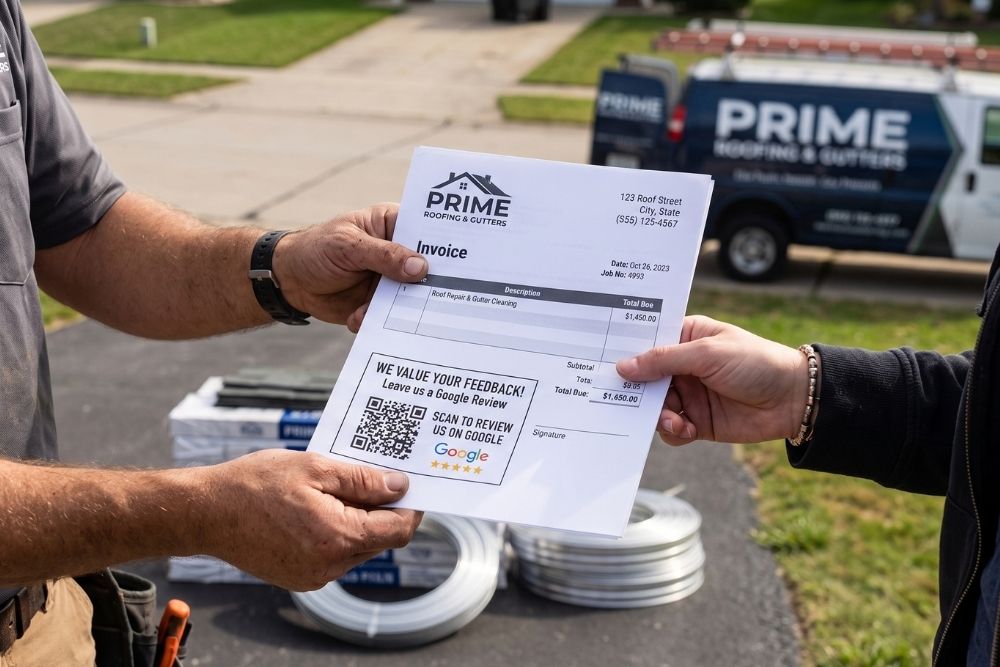
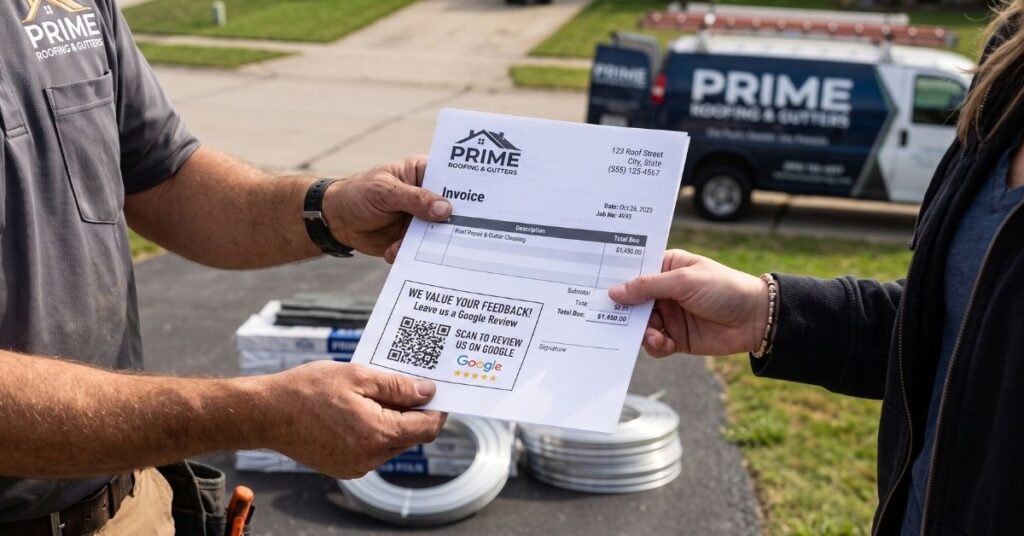
Your Business Profile will generate a short Google Reviews link and a QR code for you. It takes about a minute to find, and it’s worth doing properly rather than sending people a link to your profile and hoping they find the review button.
Then put it in the places where a job finishes:
- On the invoice. Printed, PDF, whatever your system sends. Bottom right, QR code, one line of text. A customer looking at an invoice is already thinking about the job.
- On the leave-behind. The card or magnet on the water heater with your number on it.
- In the email signature of anybody who talks to customers.
- In the same-day follow-up text.
And where not to put it: a tablet at the counter, a shared phone, a laminated sign in the lobby with “scan me before you go.” Those are the setups Google is now specifically discouraging, and a batch of reviews all coming from one wifi network looks like exactly what it looks like.
Ask Everyone, Including the Tough Ones
Gating feels sensible. Ask the customer who hugged you; skip the one who complained about the schedule. Google banned it, and honestly, it was never doing you many favors anyway.
A profile of nothing but five-star raves reads as suspicious to a careful shopper. A profile with an occasional four-star that says the crew ran late but did clean work, followed by a calm response from the owner, reads as a real business run by real people. That second profile converts better.
So the ask goes out to everybody, the same way, every time. If somebody’s unhappy, you’d rather know it, and you’d rather have your reply sitting under it in public where the next customer can see how you handle things.
How to Answer a Three-Star Review

Five-star responses are easy and should be short. One-star responses take a cool head. But the three-star is the one that trips people up, because it’s usually half fair, and the temptation to explain yourself is enormous.
The anatomy of a good one:
- Thank them by name if they gave one. No preamble.
- Name the specific thing they raised. Shows you read it.
- Own the part that’s yours. Even if it’s just the scheduling.
- Skip the part that isn’t. Don’t re-litigate. Nobody reading this later cares who was right.
- Give a real way to continue it offline. A name and a direct number.
- Stop. Four sentences, tops.
Here’s the shape:
Thanks for the honest feedback, Dana. You’re right that we pushed your appointment twice that week, and that’s frustrating when you’re without heat. The install itself sounds like it went the way it should, and we’re glad the system’s running. If you want to talk through the scheduling side, call me directly at 218-555-0100 — Mike, owner.
What’s absent: no “we’re sorry you feel that way,” no explanation of the emergency call that ran long, no request to update the rating. That last one is worth underlining. Asking someone to revise or remove a review in exchange for anything is a policy violation now, and asking for it in public reads badly regardless.
What an AI Assistant Pulls from Your Reviews
Here’s where reviews have quietly changed jobs.
When somebody asks ChatGPT or Google’s AI Overview who’s good for septic work around Bemidji, the assistant isn’t sorting by star rating. It’s reading text and looking for corroboration — several independent sources describing the same business doing the same kind of work in the same area. Your Google Reviews text is some of the strongest material it has, because it wasn’t written by you.
What tends to carry weight:
Specific service language. Ten reviews that say “great service, highly recommend” tell an assistant almost nothing. Three that mention a well pump, a drain field, and a frozen line in January tell it what you actually do. This is the best argument for open-ended asks: people who write in their own words name the job.
Place names, mentioned naturally. A review that says the crew came out to a place north of Blackduck in a blizzard is geographic evidence written by somebody other than you. You can’t ask for this — directing review content is against policy — but it happens on its own at a decent rate when customers write freely.
Recency and rhythm. A steady trickle over two years reads as an operating business. Fourteen reviews in one week two years ago reads as a campaign, to Google’s systems and to a language model both.
Your responses. This one is underrated. Your replies are public text attached to your profile; they’re written entirely by you, and they’re completely within policy. A reply that says “glad we could get the boiler swapped out before the cold snap — call us if the new thermostat gives you any trouble” adds clear, natural language about what you do and where. Not stuffed with keywords. Just written like a person who does the work.
Agreement with everything else. Assistants weigh consistency. If your Google Reviews describe plumbing and septic, your Business Profile categories say plumbing, and your website says the same, that’s three sources agreeing. If they disagree, the assistant hedges or picks somebody else.
The short version: the review profile that reads best to a human reads best to an AI too. That overlap has held through every change so far, which is why we keep pointing at it. There’s more on the mechanics in our guide to AEO for local businesses.
The Routine, in Five Minutes a Week

The whole system, stripped down:
- One trigger. Job closes. Not “when we remember.”
- One link. Generated from your Business Profile, saved everywhere it needs to live.
- One ask, verbal, at the moment of relief. Same wording every time, open-ended.
- One follow-up, same day, with the link in it.
- Everybody gets it. No screening.
- One five-minute block a week to respond to whatever came in.
That’s it. Three or four reviews a month from a small operation compound into something substantial inside a year, and it does it without a campaign, a contest, or a policy problem.
Common Questions
How many reviews do I actually need? No threshold flips a switch. What matters more is having enough recent ones that your profile looks current, and enough detail in them that they describe your actual work. A steady pace beats a big number that stopped two years ago.
Can I use Google Reviews request software? Yes, as long as you turn off the gating feature. Many of these tools were built around asking for feedback first and only routing happy customers to Google. That setting has to be off. Check it, because plenty of them still ship with it on by default.
What about a bad review that’s clearly not a real customer? You can report it through the Reviews Management Tool in your Business Profile. Genuine negative reviews stay, and appealing those is a losing errand. Fake ones, off-topic rants, and extortion attempts are worth flagging.
Should I ask for reviews on other platforms too? Google first, because it feeds the map results and most AI answers. If your trade has a platform customers genuinely use, add it second. Don’t spread one ask across four sites.
Some of my reviews disappeared. What happened? Google removes a lot of review content automatically, and 2026 sweeps have been catching older reviews that match banned patterns. If a batch vanished, look at how those particular ones were collected. Usually there’s a common thread.
None of this is complicated, which is exactly why it doesn’t get done. A review routine is a small habit attached to the end of every job, and its whole advantage is that it keeps running while nobody’s thinking about it.
If you’d rather have the templates built, the link generated, the follow-ups automated, and somebody keeping an eye on the responses, get in touch. We’ll look at what your Google Reviews profile has now and tell you what’s worth changing.
A note on the policy dates: Google’s review rules changed three separate times in early 2026, and they’ll likely change again. The dates referenced above — official review link and QR code documentation on December 31, 2025, the Maps Trust and Safety Report on April 16, 2026, and the two new Rating Manipulation clauses added on April 17, 2026 — were accurate when we published this. Before you make changes to how your business collects reviews, it’s worth checking the current language yourself at Google’s Maps user-generated content policy, particularly the Prohibited and restricted content section. If you spot something here that’s fallen out of date, tell us, and we’ll fix it.
Last verified: September 2026